Windows
Captain Connect 1.3.82 for 64-bit Windows computers.
Download for WindowsCaptain Connect downloads
Get the current Windows release or join the controlled Android beta.
Captain Connect 1.3.82 for 64-bit Windows computers.
Download for WindowsRequest approval to test Captain Connect through Google Play.
Join the Android BetaWindows release
SHA-256
AB611567503C20661400921D72029EE5C3C27C2125E2434E92807E8E97E347B8The installer is self-contained. It is currently unsigned and may trigger a Windows security warning.
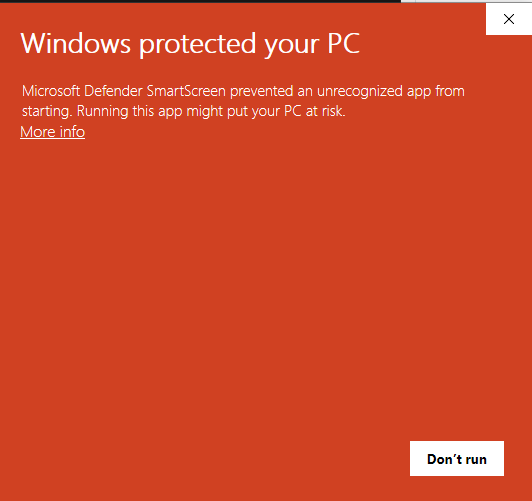
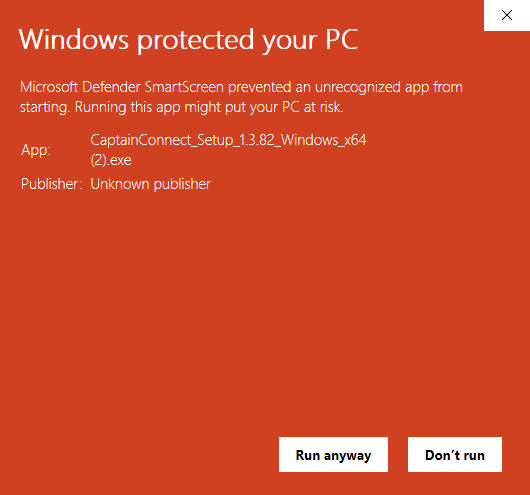
Expected Windows message
Captain Connect is still in development and this installer is not yet digitally signed. Microsoft Defender SmartScreen may call it an “unrecognized app.” This warning is expected for the current release.
Only continue when you downloaded Captain Connect from this official Captainlink.pro page.
Install Captain Connect
Select “Download for Windows” and save the installer.
Open CaptainConnect_Setup_1.3.82_Windows_x64.exe. If SmartScreen appears, follow the verified steps above.
Finish setup, then open Captain Connect from the Start menu.
Need help installing or signing in?
Visit Captain Connect support